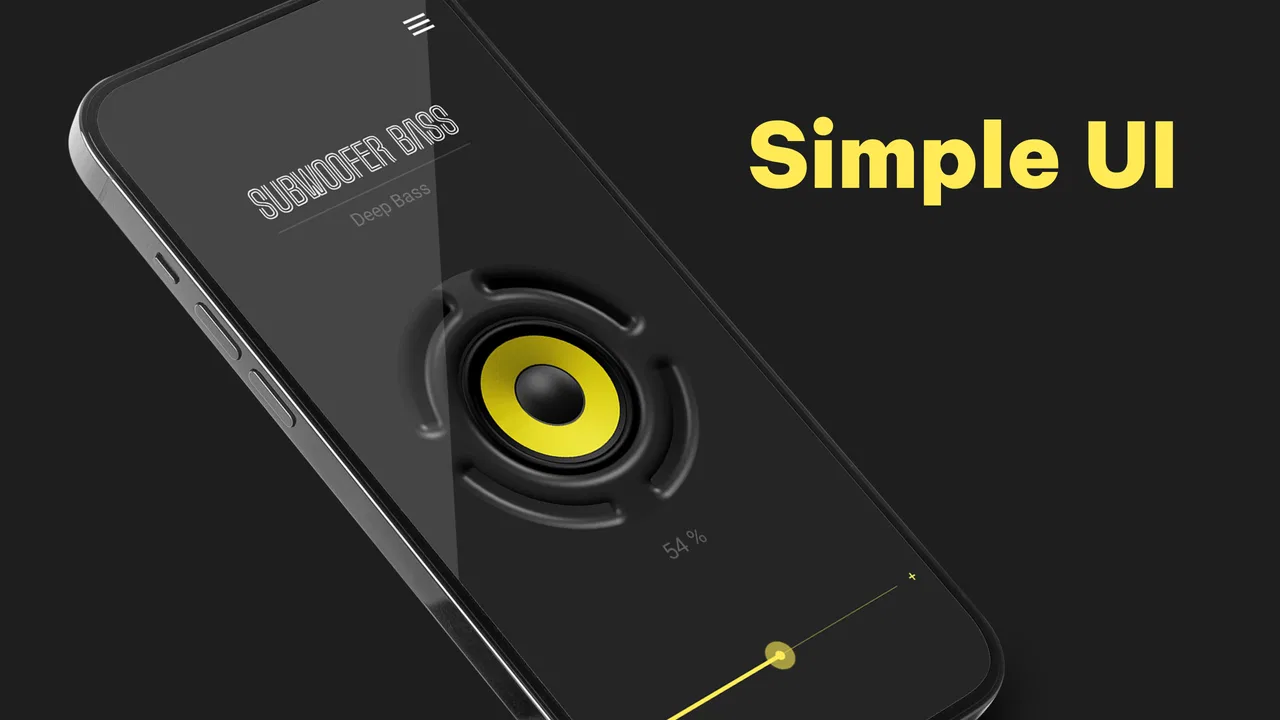
Subwoofer Bass - Bass Booster
- 4.7
- Rating
- 10.00M
- Installs
- Free
- Price
 Analysis by App-foxy
If your phone sounds thin when you play music through its built-in speaker, Subwoofer Bass - Bass Booster takes a very direct approach: it tries to make low frequencies feel stronger. I spent time using it as a simple music and audio tool, and my impression is that its value depends less on the promise of “more bass” and more on where, how, and through which speaker you listen.
This is a free Android app from ZipoApps in the Music & Audio category. It is aimed at people who want a quick sound adjustment rather than a full recording studio or a complicated equalizer. The app has built a large audience, with a 4.7 average from roughly 106 thousand ratings and more than 10 million installs. That popularity makes sense: the idea is easy to understand, and there is no need to learn advanced audio terminology before trying it.
My honest view is that it works best as a small listening improvement for casual situations. It cannot turn a phone speaker into a real subwoofer, and it should not be judged by that impossible standard. What it can do is change the character of supported audio so that drums, bass guitar, electronic pulses, and movie effects feel more noticeable. Whether that sounds better depends heavily on your hardware and on how aggressively you use the control.
You May Also Like

 Blood Strike: 2.5 Anniversary
Blood Strike’s Loadouts Turn Every Drop Into a Tactical Gamble
A close look at Blood Strike’s custom loadouts: how fast access to signature weapons reshapes its battle royale rhythm, rewards preparation, and narrows the gap between fights.

 Pandora - Music & Podcasts
Pandora’s Music Is Easy to Start, but Harder to Recover
Pandora’s strength is its low-effort path from a seed to a station. Its weak spot is how much confidence it asks you to place in connection, setup, and quiet recovery.

 8 Ball Pool
 Is Built on Rivalries, Rematches, and Routine
A close look at the rivalries, rematches, shared routines, and unanswered safety questions that turn a quick pool match into a persistent mobile community.

 Samsung Music
’s Quiet Strength Is Playing What You Already Own
Its reach comes less from spectacle than from dependable access to a personal library. That simplicity is both the app’s strongest retention engine and its ceiling.

 AccuWeather: Weather Radar
AccuWeather Review: A Quick, Clear Forecast for Everyday Decisions
For everyday plans, the best forecast is the one you can understand quickly. AccuWeather makes rain timing, radar, and local conditions easy to act on, with a few trade-offs.

 Hill Climb Racing
Why Hill Climb Racing Still Turns Crashes Into One More Run
A tiny car, a bumpy hill and one more upgrade: Hill Climb Racing keeps resurfacing because its simple chaos makes every near-miss feel personal.
More From Our News Desk
View All News


What the bass-boosting capability really changes
The central capability is straightforward: the app emphasizes the lower part of the sound you are hearing. In practical terms, that can make a track feel warmer, heavier, or more energetic. A song that sounded flat through a small speaker may gain a little body, while a pair of headphones with a restrained low end may feel more satisfying.
There is an important distinction between hearing more bass and hearing better bass. A software booster does not create physical speaker movement that the phone or headphones cannot produce. Instead, it changes the signal before it reaches the output. If the hardware is capable of reproducing those frequencies, the result can be enjoyable. If it is not, the same adjustment may mostly create a louder, blurrier, or less balanced sound.
I found the effect easiest to appreciate with music that already has a clear low-frequency foundation. Electronic tracks, hip-hop, reggae, dance music, and soundtracks can benefit because the bass line is an intentional part of the arrangement. Acoustic recordings and spoken content are less obvious cases. Adding too much low end to a podcast, audiobook, or voice memo can make speech feel cloudy rather than richer.
The useful insight is that the app is not a universal “better sound” button. It is a targeted tone change. That makes it more useful when you know what is missing from your current setup. If your problem is weak bass, it may help. If your problem is harsh treble, quiet dialogue, poor mastering, or a damaged speaker, this is probably not the right solution.
Why the listening device matters so much
On a phone’s built-in speaker, the change may be subtle because compact hardware has limited room for deep low frequencies. You might notice a fuller impression in the lower midrange, but you should not expect the physical rumble associated with a dedicated speaker. In some cases, pushing the effect too far makes the speaker work harder without delivering a convincing bass note.
Headphones and external speakers are a more promising match. They usually have drivers that can reproduce more of the adjusted signal, so the difference can be easier to hear. The trade-off is that headphones already have their own tuning. A bass-heavy pair can become tiring or muddy, while a neutral pair may gain the extra weight you wanted.
I recommend starting with a familiar song rather than judging the app with a random track. Pick something you know well, listen briefly with the effect reduced, then raise it gradually. This makes it easier to identify whether the improvement is genuine or whether the sound is simply louder. Loudness often feels like quality at first, but the impression can disappear after a few minutes.
How I would use it in practice
The best workflow is simple and conservative. I would open the app before a listening session, choose one track with a steady bass line, and make a small adjustment. After that, I would test a second track from a different style. If both sound fuller without losing vocals or percussion, the setting is probably reasonable. If only one song improves, I would treat the effect as a situational preference rather than a permanent setting.
This approach also helps with the most common problem: distortion. When the low end is boosted beyond what the device can handle, bass notes may lose definition, vocals can seem pushed backward, and busy sections may turn into a congested wall of sound. Lowering the effect is often more effective than increasing the phone’s volume. The goal is controlled weight, not maximum impact.
Another practical tip is to judge the app at the volume you normally use. Testing only at a very low level can hide distortion, while testing at an unusually high level can exaggerate it. I also prefer checking the beginning, middle, and chorus of a song because some arrangements have much more bass in one section than another.
Where it fits into an everyday listening routine
I find that a bass booster earns its place not only by changing a track, but by fitting into the moments when I actually listen. In this section, I’ll look at how I’d make a quick, sensible adjustment around everyday routines, then turn to the compromises that become easier to notice with repeated use.
A realistic phone-speaker scenario
Imagine cooking in the evening with your phone on a counter. You are not trying to recreate a concert; you simply want the music to feel less tiny while you move around the room. This is the kind of situation where the app makes the most sense. A modest bass adjustment can give rhythm tracks more presence, making the phone sound less sharp and narrow.
In that scenario, I would keep expectations modest and avoid using the strongest setting. The room, the counter surface, and the phone’s speaker placement all affect the result. A hard surface may already emphasize certain frequencies, so an aggressive boost can quickly become boomy. Moving the phone a little farther from a wall may improve the sound more naturally than adding more processing.
The app is also useful when sharing a quick listening session with a friend and using a small portable speaker. Some compact speakers are tuned with a conservative low end to avoid distortion. A gentle adjustment can make casual music more engaging, especially at moderate volume. Still, the speaker remains the limiting factor, and the app cannot replace a larger enclosure or a dedicated subwoofer.
Headphones, commuting, and quiet personal listening
With headphones, the experience becomes more personal. If your headphones sound clean but a little light, a bass adjustment can make familiar playlists feel new without changing the headphones themselves. I particularly like this as a temporary option for certain genres rather than a setting I would leave enabled for every recording.
There is also a comfort consideration. Strong low frequencies can be fatiguing even when they do not sound distorted. If you use the app during a long commute or extended listening session, take your ears seriously: a setting that feels exciting for one song may become tiring across an entire playlist. I would use a lower level for long listening and reserve stronger changes for short, energetic tracks.
For spoken audio, I would usually skip the effect. Some voices may sound warmer, but bass emphasis can reduce clarity, especially when the recording already has room noise or a deep voice. If your main purpose is podcasts, lectures, or audiobooks, a voice-focused equalizer or the playback app’s own speech controls may be a better match.
Music, video, and different source material
Music is the clearest use case, but the same idea can affect videos and games when their audio passes through a compatible playback path. Explosions, engines, and musical scores may feel more substantial. Dialogue-heavy content is less predictable because stronger low frequencies can compete with voices.
I would test the app with several types of content before deciding whether it belongs in your daily setup. A bass line that sounds excellent in a polished studio recording may expose muddiness in a low-quality stream. Older recordings can also react differently from modern productions. This is why one preset rarely suits every source.
For people who record, mix, or critically evaluate music, I would not use this as a reference tool. It is designed for listening enjoyment, not accurate monitoring. Any tonal change can mislead you about how a track really sounds. A neutral monitoring setup and dedicated audio software remain the better choice for production work.
Trade-offs that become clear after regular use
Connectivity matters most when a listening setup changes unexpectedly: moving between a phone speaker and headphones, or switching playback apps, can change what the processing sounds like. I’ll focus on practical ways to check those changes and respond when the effect is inconsistent, while keeping expectations grounded in the device and audio route at hand.
More impact can mean less detail
The main limitation is the balance between impact and clarity. Bass does not exist separately from the rest of a mix. When it becomes too prominent, vocals may seem recessed, kick drums can lose their edge, and instruments in the lower midrange may blend together. The app can improve a thin track, but it can also make a well-balanced track less natural.
I would therefore treat the setting like seasoning. A small change can improve the meal; too much hides the original flavors. This is especially important with headphones that already have emphasized bass. If the sound becomes soft around the edges, reduce the effect even if the first impression was exciting.
Hardware limits cannot be bypassed
Software processing has a ceiling. A phone speaker with little low-frequency capability cannot reproduce deep bass simply because an app requests it. In that situation, the adjustment may be perceived as extra warmth or resonance rather than true sub-bass. That can still be pleasant, but it is different from the physical sensation many people expect from the word “subwoofer.”
External hardware remains the stronger upgrade when your priority is genuine low-end extension. A suitable speaker or headphones will usually make a larger difference than any software booster. I see this app as a convenient experiment before spending money on equipment, not as a replacement for equipment.
Free access and the purchasing decision
The app is free to use, which makes it easy to try without committing to a purchase. It also includes optional in-app purchases ranging from $0.99 to $99.99 per item. That wide range means I would pay close attention to the purchase screen and choose carefully rather than assuming every enhancement is necessary.
For casual listeners, the free experience may be enough to decide whether the underlying sound change suits them. I would not pay simply because a stronger effect is available. First, compare the result at a comfortable volume across several songs and devices. If the improvement is only obvious when the sound is exaggerated, the purchase is unlikely to solve the real limitation.
Compatibility and expectations on Android devices
The app supports Android devices running version 5.0 or later, and its current version is 3.5.8. In everyday use, the important question is not only whether the app installs, but whether it affects the particular audio route you use. Android phones, headphones, speakers, and playback apps can handle audio processing differently.
That means I would test the exact setup you care about: the same phone, the same headphones or speaker, and the same music app. Do not judge it only through one output and assume the result will be identical everywhere. If you switch from the phone speaker to wireless headphones, repeat the listening test because the hardware response may change the result completely.
Who gets the most from this app
The strongest audience is someone who already likes their phone or headphones but finds the sound too light. This person wants a quick change, does not need detailed mixing controls, and is happy to adjust the sound by ear. The app is also a sensible low-risk experiment for someone deciding whether better audio equipment is worth considering.
It can be particularly appealing to listeners whose playlists center on bass-driven music. The benefit is not that every song becomes superior, but that the rhythmic foundation may feel more present on modest hardware. If you often listen in kitchens, bedrooms, offices, or other casual spaces where carrying a larger speaker is inconvenient, that convenience matters.
People who want a simple, reversible adjustment may prefer this over a full equalizer. A traditional equalizer offers more control, but it also asks you to understand several frequency bands and manage different settings. This app’s focused purpose is easier for a friend to try in a minute. The trade-off is less precision and less ability to correct other problems in the sound.
I would recommend skipping it if you are looking for accurate audio, professional mixing, detailed per-band control, or a genuine physical subwoofer effect. It is also not the best match if your main content is speech. In those cases, a neutral setup, a dedicated equalizer, better headphones, or a more capable speaker would address the need more directly.
How it compares with the usual alternatives
The usual alternative is the equalizer already built into a phone, music player, or headphone companion app. Those tools may offer presets or several adjustable bands, giving you more control over vocals, treble, and midrange as well as bass. They are better when you want different profiles for different genres, but they can be less convenient for someone who only wants extra low-end weight.
Another alternative is a hardware upgrade. Better headphones or a larger speaker can improve bass extension, detail, and overall balance at the same time. That route costs more and is less immediate, but it addresses the physical limitation rather than processing around it. I would choose hardware when listening quality is a major priority instead of an occasional preference.
Compared with simply increasing volume, bass boosting is the more sensible experiment. Turning up volume makes everything louder, including harshness and background noise, while a targeted adjustment changes the tonal balance. Even so, it is not automatically safer or cleaner: excessive bass processing can still cause fatigue and distortion. I would always compare at similar loudness before deciding which sound I prefer.
My recommendation after using it
Subwoofer Bass - Bass Booster is a focused app with a clear purpose, and that focus is its strongest quality. It does not ask me to rebuild my music setup or learn audio engineering. When paired with hardware that can reproduce the adjusted signal, it can make bass-led music feel fuller and more enjoyable in everyday listening.
The results are not equally impressive on every phone or every track. The built-in speaker remains a physical constraint, and heavy processing can blur detail. I would use it gently, test it with familiar songs, and create separate expectations for music, speech, and video. That small amount of discipline makes the difference between a pleasant improvement and an unpleasant rumble.
ZipoApps has kept the concept accessible, and the Everyone content rating makes it suitable for a broad audience. Since it is free to try, I think it is worth testing if your current sound feels weak and you want a quick answer before buying new equipment. The app has been available since June 5, 2015, and its continued presence alongside a large install base suggests that this simple use case remains relevant.
My final recommendation is conditional but positive: try it if you want more low-end energy from an existing Android setup, especially for music and casual listening. Keep the adjustment restrained, compare several outputs, and do not expect software to create the physical behavior of a real subwoofer. For a listener who understands that trade-off, it is a convenient free tool; for anyone seeking accurate or genuinely powerful bass, better hardware is the more convincing investment.
FAQs for Subwoofer Bass - Bass Booster
01What is Subwoofer Bass - Bass Booster used for?
Subwoofer Bass - Bass Booster is designed to enhance the low-frequency sound produced by your phone, headphones, or external speakers. It can make music, videos, games, and podcasts sound deeper and more powerful by increasing bass levels and applying audio effects. The exact result depends on your device, headphones, speaker quality, and the original audio recording.
02Does Subwoofer Bass - Bass Booster really make my phone sound like a subwoofer?
The app can improve the perception of bass, but it cannot physically create the same deep, powerful sound as a dedicated subwoofer. Smartphone speakers have limited hardware and cannot reproduce very low frequencies at high volume. The app works best with headphones, Bluetooth speakers, or external audio systems that are capable of producing bass. Results may vary between devices and audio sources.
03Is Subwoofer Bass - Bass Booster compatible with music and other audio apps?
Compatibility depends on your Android device, operating-system version, audio output, and the way another app handles sound. The booster may work system-wide on some phones, while on others it may only affect audio played within the app or through supported players. If you notice no difference, try restarting playback, changing the audio output, or checking whether another equalizer is overriding its settings.
04Can using a bass booster damage my headphones or phone speakers?
Excessive bass enhancement and high volume can cause distortion and may place additional stress on small phone speakers or low-quality headphones. It is safer to begin with a moderate boost and increase it gradually while listening for crackling or muffled sound. Avoid using maximum volume for long periods, and remember that loud audio can also harm your hearing regardless of which booster app you use.
05Is Subwoofer Bass - Bass Booster free, and does it contain ads or in-app purchases?
The availability of free features, advertising, and optional purchases can vary according to the version installed and the store listing for your region. Basic bass enhancement may be available without payment, while advanced controls or an ad-free experience may require an upgrade. Before downloading, review the current Google Play or App Store description so you understand any subscription, purchase, or advertising conditions.
Pros
- Simple interface makes bass adjustments quick and easy.
- Works with music
- videos
- podcasts
- and many streaming apps.
- Preset profiles help users switch between listening styles.
- Real-time effect makes changes easy to hear while adjusting.
- Can improve weak-sounding speakers and inexpensive headphones.
Cons
- Strong bass boosts may cause distortion at higher volume levels.
- Some features may require in-app purchases or display advertisements.
- Results vary considerably depending on the phone and headphones used.
- Continuous use can drain battery faster during music playback.
- Excessive low frequencies may reduce vocal clarity and detail.

Subwoofer Bass - Bass Booster
Gallery